Carta Luna · Card of the moon — A tarot reading
on your own table.
Put on a Meta Quest 3 and a tarot deck appears on your real table. Shuffle it in your hands, draw the cards yourself, and turn them over to see what they reflect back.
- Mixed reality
- No install, no account
- Hands or controllers
- Best on Meta Quest 3, in the Quest Browser.
- On a phone or computer, you can watch a friend’s reading.
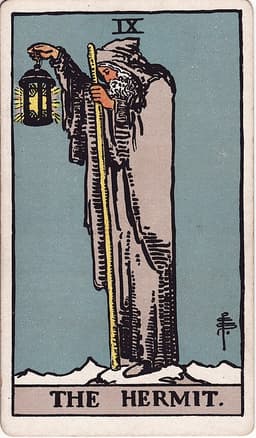

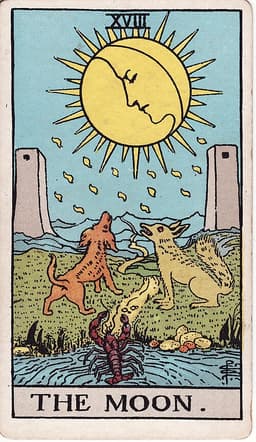
Present · The Star, upright
How a reading works
The table, the cards, and you.
Your table, your room
The deck finds your table.
Carta Luna looks for the table you marked in Space Setup, then any flat surface at table height, and lays a cloth mat on it. Grab the mat to move it: it settles back onto the table when you let go and stays anchored to the room.
- Where the mat goes
- 1Your Space Setup table
- 2The nearest flat surface at table height
- 3A floating mat in front of you
Shuffle, draw, turn
Every card passes through your hands.
Tap the deck, or lift it and give it a shake, to shuffle. Pinch the top card to draw it, and turn your hand over to turn the card. The order comes from your device’s secure random generator, and any card can land reversed.
- Hand tracking
- Controllers too
- ShuffleTap the deck, or lift it and shake
- DrawPinch the top card
- TurnTurn your hand over
With controllers
- Take a card
- Trigger, up close
- Lift the deck
- Grip button
- Tap from a distance
- Point and pull the trigger
Reflect
Each card asks you something.
Every face-up card gets a meaning panel: what its position asks, whether it’s upright or reversed, three keywords, a short read, and a question to sit with. All 78 cards are written for Carta Luna, as a mirror rather than a forecast.

Present
Where you stand right now.
The Star · Upright
- hope
- renewal
- quiet trust
After a hard stretch, The Star shows up like the first clear night. It points to the part of you that is still willing to hope, even a little, and to the small ways you are already healing. Nothing here has to be rushed.
What small sign of renewal have you noticed in yourself lately, even if it felt too quiet to count?
Seven spreads, or your own
From one card to twelve.
Start with a single card or go all the way to the Celtic Cross. The mat grows to fit the spread, with faint outlines marking each spot. Or make your own: choose how many cards and a shape, then name each spot, all without typing.
Single Card
1 card
Past, Present, Future
3 cards
Mind, Body, Spirit
3 cards
Crossroads
5 cards
Horseshoe
7 cards
Celtic Cross
10 cards
Twelve Houses
12 cards
Make your own
1 to 12 cards, in a row, rows, an arc, a ring or a cross. Name each spot from 48 reflective names; up to 8 spreads are saved.
Set the scene
Read in your room, or under the stars.
Stay in your own room through passthrough, or step into a night-sky sanctum, a sunset sea of clouds, or a fairy circle in a forest. Lay out the deck’s own 1909 back or one of six original designs.
Night-sky sanctum
The default
Sunset cloud sea
Fairy circle
Your own room
Through passthrough
Seven card backs
- 1909 roses & lilies
- Celestial
- Botanical
- Sacred geometry
- Minimal
- Neon circuit
- Winter
The deck’s own 1909 roses and lilies, or Celestial, Botanical, Sacred geometry, Minimal, Neon circuit and Winter.
Read together
Bring a friend to the table.
Open a room and share its six-digit code. Each headset lays the mat on its own table, wherever everyone is, and the cards move for everyone.
The reader
Opens a room from the headset and leads the reading. They can change what guests do at any time.
A friend in a headset
Joins with the code and lays the mat on their own table, then:
- Watch
- The reader does everything.
- Shuffle
- The guest shuffles; the reader draws and turns.
- Press Next
- The guest moves the reading along, one step at a time.
Up to six on a screen
On a phone or computer, tap Watch a reading and type the code. See the table in 3D, tap a turned card for its meaning, and shake your phone to shuffle when the reader allows it.
Anyone can join or rejoin at any point and catches up straight away.
Private by design
A reading is personal. It stays that way.
No accounts, no analytics, no cookies, no tracking. Carta Luna loads only its own files, and it talks to nothing else unless you choose to read together.
Your room stays in the headset
With your permission, the Quest Browser shares the planes and furniture it detects so the mat can find your table. Carta Luna uses them in the moment and never stores or sends them.
Readings aren’t saved
When a reading ends, it’s gone: no history, and no copy on a server.
Shared readings are encrypted
The room code never leaves your headset. It becomes an encryption key and a separate room ID, messages are sealed (AES-GCM) before they leave, and the relay that passes them along stores nothing.
What stays on your headset
- iwsdk_scene_anchor_uuid
- One anchor ID, so the mat comes back to the same spot.
- arcana.settings.v1
- Your settings: deck, card back, surroundings, and whether you’ve seen How it works.
- arcana.spreads.v1
- Spreads you make: their shapes and position names.
Settings › Your data › Clear saved data removes your settings and spreads.
What the relay can see: the room ID, each device’s IP address, when messages are sent and how big they are, and the sealed messages, which it can’t read.
The limit of a six-digit code
A code has a million possibilities. Encryption keeps readings out of the relay’s sight, but someone who recorded the traffic could try every code offline. Treat a shared reading like a phone call, not a vault. A room only exists while the reader has it open.
This page is part of the Screen Sage site, which has its own privacy policy. Carta Luna itself runs at https://cartaluna-mr.vercel.app.
Questions
Frequently asked
A Meta Quest 3 and its built-in Quest Browser. Open cartaluna-mr.vercel.app and tap Begin. There’s nothing to install and no account to make.
Run Space Setup in the headset’s settings first and mark your table. When Carta Luna asks to use spatial data, allow it, so the mat can find the table.
Carta Luna tries your Space Setup table, then the nearest flat surface at table height, then a floating mat in front of you. Reach out and grab the mat to move it, point and pinch to slide it, or choose Move the mat in the menu.
Yes. Pull the trigger up close to take a card, hold the grip button to lift the deck, and point and pull the trigger to tap from a distance.
Yes. Up to six people can watch on a phone or computer: they open Carta Luna there, tap Watch a reading, and type the room code. One more friend can join in a headset.
Choose Make your own: pick 1 to 12 cards and a shape (a row, rows, an arc, a ring or a cross), then tap each spot and pick its name. Up to 8 of your spreads are saved on the headset.
No. Carta Luna is a tool for self-reflection, not fortune telling. Every card comes with a short read and a question to sit with; what it means is up to you.
The deck is the 1909 Rider–Waite–Smith, drawn by Pamela Colman Smith and now in the public domain. The six original card backs are drawn in code.
Still have a question?
Carta Luna is in beta, and every note from a reading helps.
“Not a forecast. A mirror, laid out on your table.”
Open Carta Luna(opens in a new tab)- Best on Meta Quest 3, in the Quest Browser.
- On a phone or computer, you can watch a friend’s reading.